Hi everyone, today I am sharing another layout created for Cocoa Vanilla Studio, this time for the August monthly challenge. This challenge was actually designed by me, and I think almost everyone will be able to find an element to inspire them from the board, whatever your style.
Here's a look at the board, entitled "Life is a Canvas"...
And here is my sample layout...
I really love the mix of eclectic images that I put together for this arty board. There are lots of rich, vibrant jewel tones; textures like brick and wood; and (of course) a butterfly. I did a bit of stash-busting for this page, and used the Wild at Heart collection from a few years ago, as I thought the colours and theme of this collection worked well with the board. The photo I was working with was one of my daughter with paint smeared on her face.
I started my page by creating a mixed media background using Distress Oxides. I used Faded Jeans first (one of my very favourite oxide colours), by swiping the ink pad on my messy mat, mixing it with a little water, and then laying my cardstock over the top to soak up the colour. I then layered some Worn Lipstick over the top, which I applied using the packaging technique to give me a little more control over the placement of the colour. I then added some splatters using Mustard Seed and a fine paint brush.
Next, I added some stencilled detail using an arty themed stencil from Dusty Attic. Again, I used the Faded Jeans Distress Oxide, only this time I used a sponge to apply it through the stencil. For my next layer, I added some stamped detail over the top using a brick pattern stencil from Viva Las VegaStamps and black ink.
The next element I introduced to my page was a cut file from Cut to You. The cut file I used was the Craft a Happy Life page builder file, and I altered it by enlarging it and only using part of the design (the paint brushes) for my layout. I left the cut file white, and layered it over my mixed media background, which allowed the layers to show through the gaps.
Then came the easiest part, which was adding some layers of patterned papers to mat my photo, some frayed gauze, a paper doily, and then the photo itself. I also fussy cut some floral pieces from another patterned paper that I used to tuck into my layers above and below my photo. I also added three fussy cut butterflies.
For my title, I used the new 'These Days' foam title stickers for the word life and some other small alphas from my stash for the remainder, then finished off the quote with typed strip journaling.
I finished off my layout by using the same Distress Oxides and a water brush to add some colour to the tips of the cut file paint brushes; and by adding a few sparkly enamel dots.
I would love to see your take on my mood board! Entries close 31st August and you can enter via the Cocoa Vanilla Studio Community group. A random entry will win a $25 voucher to spend in the Cocoa Vanilla store on some scrappy goodness, so get busy!
Hi everyone, today I am here to share a layout that was created for a very special celebration. My dear friend Gwen Wruck's YouTube channel, "Created by Gwen" is one year old today. (Congrats Gwen!) To mark the occasion, a group of us have joined forces to put together a YouTube hop. The theme of this hop is to be inspired by Gwen's crafty style, and to try and include Gwen's top five signature scrappy elements. These are a square photo (4x4" preferred); cut files; patterned paper; layered clusters and stitching. If you aren't already familiar with Gwen's work, you can find her YouTube channel here: https://www.youtube.com/c/CreatedByGwen
Here's a look at the layout I created...
The photo I chose to document for this page is of my hubby and I last month as we were popping out for a lunch date to celebrate 20 years together.
So for my layout, I started with a sheet of my favourite 300gsm white cardstock. I decided to add some mixed media to my page, but as Gwen isn't a huge mixed media fan, I kept it relatively subtle. I used Tattered RoseDistress Oxide applied with the packaging technique, then Rustic WildernessDistress Oxide to add some splatters.
I used a sheet of patterned paper from the Amy TanLate Afternoon collection to back my cardstock, giving me a green border for my page. My intention had been to stitch around the cardstock edge to tick off the stitching element, but unfortunately when I pulled my machine out to use I found I had an empty bobbin, and being late at night it was all too hard and I just went without it.
Now it was onto the main portion of my layout. In another move that was inspired by Gwen and her "Maggie Holmes Monday" series she runs on her channel, I decided to pull out some of my own Maggie goodies and use them too.
I had a couple of partly used sheets of paper from the Crate Paper Marigold collection that I had left-over from previous projects, which I combined with a sheet from the Crate PaperBloom collection. I created a double layered mat for my photo, and I also added a white paper lace doily and some frayed gauze into my stack. (I know the gauze isn't Gwen's style, but I still wanted to make it my own.)
Whilst digging in my Crate Paper stash for materials for this page, I stumbled upon a pack of chipboard frames from waaay back. (The Open Book collection to be exact - remember that one?) I knew this would be the perfect opportunity to use a few up, as Gwen often includes chipboard pieces on her pages. I chose 3 frames and layered them under my photo, following my natural instinct to create a "visual triangle"...and then I had to make a left turn.
If you know anything about Gwen's style, you will know that she doesn't create her clusters in the same way I do. Instead of the visual triangle method that I usually use, she uses a technique that can best be described as "flowing clusters". That is, she creates clusters that are designed to lead the eye around the page to different points of interest. These clusters are rarely out on their own on the page, as Gwen usually keeps all her elements touching another one. So I set about adding some extra bits and pieces to my page that would be more in keeping with Gwen's method.
I used pieces from both the Open Book ephemera and floral ephemera packs, along with several small cut files that I also tucked into my layers. All of the cut files I used were from CutToYou (of course), as that is Gwen's very own cut file store. I used the Open Leaf Stem file (one of my faves), as well as two other floral pieces from the Caite Floral Set, all of which I coloured using Stormy SkyDistress Oxide.
I finished off my layout with a few stickers from the Crate PaperGarden Party sticker book; some Doodlebug Design gold puffy hearts; gold number Thickers for my title; and two beautiful CutToYou cut file butterflies from the Mixed Butterflies set, which I left white to add a little pop of freshness back into my layers. A little handwritten journalling and I was done!
I love how this layout finished up, and I think I did a pretty well at honouring Gwen's style whilst still making it my own.
If you would like to see how it all came together, you can watch my process video here:
You will find links to all the other hop participants in my video description on YouTube.
Thanks for stopping by today so I could share this with you. Until next time, happy scrapping! X
Popping in today to share my first March project for Kitaholic Kits. This month my kit actually arrived in two parts - the mixed media kit first, and then the main kit afterwards. I was in such a hurry to get stuck into the new mixed media kit that I decided to create something right away and combine it with some left-over items from previous kits. I also had a very special photo to document, which is of my mum and I that was taken when I was a toddler.
My layout began with me creating a pretty mixed media background. I used the Dina Wakley Gloss Sprays and Darkroom Door butterfly stencil from the kit, which I combined with acrylic paints and some stamping.
You can see exactly how I put the background together, and hear me talk a bit about the Gloss Sprays, in my video here:
Once the background was done, I moved on to constructing the layout using a mixture of items from previous kits.
The patterned papers I layered under my photos were from Heidi Swapp and I used tearing and distressing, as well as a a paper doily and frayed gauze from my stash to add texture.
For my embellishments I used die cut flowers from the Jen Hadfield 'The Avenue' floral ephemera pack as well as some stickers from the Heidi Swapp 'Old School' cardstock sticker sheet and sticker book.
To tuck in amongst my layers and add some extra dimension to my page, I also used some leafy Cut to You cut files that I had left-over from a previous project. (One of the reasons I always like to cut a few extras - you never know when you will need them!) The handmade heart embellishment is from Charms Creations, and I love the way the butterfly button ties in with the butterflies on the background.
I finished off with some white sequins,which added some subtle shine to the background.
I really love how this page came out! If you would like to see how I constructed it after the background was done, you can watch my process video here:
Thanks for stopping by today so I could share this with you. Until next time, happy scrapping! X
Popping in today with a catch up layout that I created recently for Cocoa Vanilla Studio. This one was created for a theme entitled "1 paper, 3 ways" where three of the design team each shared a layout using the same patterned paper as our page background. The purpose of this theme was to showcase different ways to use the same paper, and hopefully give you some inspiration to create a page of your own. The paper we were all tasked to use was the gorgeous mixed media style Sweet Serenity from the 'Daydream' collection.
Here's the layout I created, entitled "Together"...
For this page, I chose to document a recent photo of my daughter and I that was taken during a day at the beach. (And yes, it's a selfie! I often find that if I don't stop and take a selfie with my kids, I am rarely in any photos with them.)
So my layout began with the stunning Sweet Serenity paper, which I decided to add a little more subtle detail and texture to. I first used a criss cross patterned stamp along with some grey ink to add some stamping; then used a scattered hearts stencil with modelling paste to add some small white hearts.
I then set it aside to dry while I began work on the papery portion of my page. First, I gathered some pieces of patterned paper to create a layered mat under my photo. The papers I used were All Aflutter; Up in the Clouds; and Happy Place and I used both vertical and horizontal pieces to help ground the photo to the page. I also added a grey paper doily from my stash.
Now it was time for some pretty embellishments! I have to admit, I am totally obsessed with the floral print Garden Variety paper from this collection. I love it so much I just want to fussy cut the flowers from it and stick them on every page I create. I cut a few pieces from it and tucked them in around my photo to help frame it.
My next goal was to extend out my embellishment clusters from the focal point to reach the two main mixed media areas on the page, as I didn't want them to appear to be "floating" out on their own. I did this by using some cardstock leaves I had cut on my Silhouette with a cut file from Cut To You. This enabled me to ensure that all the stencilled areas on the page were connected to the focal point.
For my page title, I chose to use the word together from the Die Cut Titles pack, which I adhered along the bottom edge of my photo using some foam tape to pop it up a bit. On the top right corner of my photo I added the small happy days with you banner sticker from the Accessory Sticker sheet; then scattered a few hearts from the Die Cut Ephemera pack
I finished off my layout by adding a doodled pencil border, some soft grey ink splatters and a few stamped phrases.
Thanks so much for joining me today so I could share this with you. Stay tuned over the next couple of days to see what else the team has in store to inspire you using the Sweet Serenity paper.
Hi everyone! Today I am popping in to share my take on this month's challenge at Scrap the Girls, which is a combination of two events that both occur this month. It's called "Boo Bees" - Breast Cancer Awareness meets Halloween. You can choose to be inspired by either of these themes, or even something else from the inspiration image below...
I decided to cover both bases by creating a boobies themed layout with a Halloween colour palette. I reckon I nailed it - what do you think?
Those fabulous photos of me with the Hooters girls were taken during my trip to Arizona for Creativation last year. The girls were so lovely and more than happy to pose with me.
To create my layout, I started by creating a quick watercolour style background using 'Faded Jeans' Distress Oxide (to tie in with my denim jacket in the photos). I then added some random stamping using a jumbled text stamp and grey ink.
Over the top of the watercolour, I added the Burst Circles cut file from this month's homegrown sponsor, Cut to You. I really wanted the shapes to pop against the background, so because I had already cut it with white, I just coloured it black with a Sharpie. I then used patterned paper from Cocoa Vanilla Studio to back a few of the larger circles to start bringing in the red / orange colours. I then set to work on some papery layers.
Underneath my photos I stacked layers of tissue paper, a paper doiley, printed tags tied with twine, and some frayed gauze for texture. I also put some scrap cardboard under my photos to help pop them up from the page.
To the left of my photos, I added a Charms Creations handmade star embellishment, which I topped with the hello flair button (from my sister's stash).
To the right of my photos I added a piece of an old floral print Hambly Screenprints transparency, and some twisted coloured wire that I attached with staples. I used some small sparkly orange alpha stickers for the first part of my title; the @ from a pack of Heidi Swapp die cuts; and then black Thickers for the word hooters. (I love a good mixed font title!)
I finished off my page by adding a some stamped phrases; orange and black ink splatters and few well-placed orange enamel dots (to help some of those circles look like boobs).
You only have 10 days left to join in this challenge to be in the running for the prizes from Cut to You (for the Aussies) or Tanya Leigh Designz (for the internationals). If you haven't already seen how the rest of the team interpreted this challenge, visit the Scrap the Girls blog HERE for more inspiration.
Hi friends! I'm popping in today with a bit of a bonus share. I have been totally loving all of the rainbows I have been seeing everywhere lately, so I felt inspired to do some stash-busting and create a simple rainbow themed page of my own.
For my layout I decided to use a cut file from Cut to You as the basis of my background. I used the file called Sunshine Rainbows and cut the rainbow portion of the design on some white cardstock. I paired it with the 'Happiness' collection from Cocoa Vanilla Studio, using the gorgeous Good Vibes paper to back the rainbow. I then trimmed down the cardstock to measure 11x11" and mounted it on a sheet of pink cardstock to create a page border.
Once I had my background together, I used a fine tip felt pen to add some faux stitching between the arches of the rainbow. This is a quick and easy technique if you don't have a sewing machine (or if like me, you just can't be bothered pulling it out at the time).
Next, I matted my photo using pieces of the Expressive and Frame of Mind papers, and I also tucked a yellow paper doily into my layers. I then placed my photo on top of my rainbow and set about adding some embellishments to the page.
I created a cluster in the top left corner of my photo using layered pink flowers from the Die Cut Ephemera pack to coordinate with the pink / red arches of the rainbow underneath. I balanced that cluster by embellishing the bottom right corner using more die cuts, only this time in blue tones to coordinate with the blues of the rainbow.
For my title, I used the bloom & grow stickers from the 'Midnight' Accessory Sticker sheet, and then a label from the 'Happiness' sticker sheet to add my journalling. I finished off my layout with some tiny splatters of navy mist.
Thanks so much for stopping by today so I could share this with you. I hope I have inspired you to perhaps create your own rainbow themed page. Until next time, happy scrapping! X
I am super excited to be sharing this with you today - Cocoa Vanilla Studio now has a new monthly challenge that will be held in our Cocoa Vanilla Studio Community group on Facebook. (Yay!) Each month the design team will take turns to collate a mood board to be used as inspiration and I am so happy to say the June mood board was put together by me!
Here's a look at my "Rustic Trails" board...
And here is the layout I created that was inspired by the board...
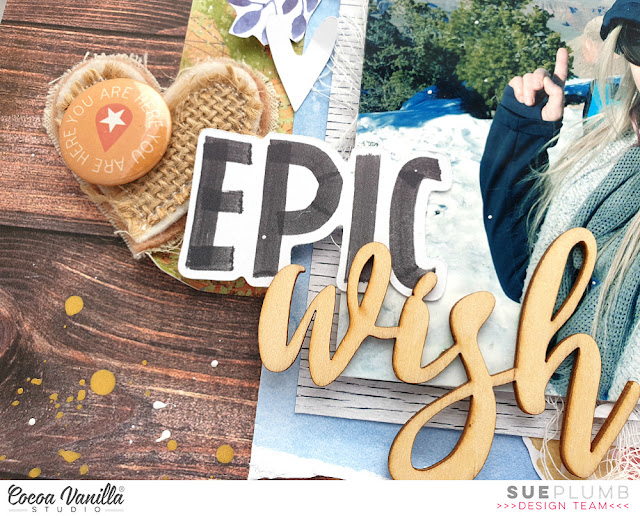
I decided to draw on the travel theme that was represented in the board by documenting a selfie I took at the Grand Canyon. This was taken at the moment I first walked up to the edge, and was a moment I had dreamt of for most of my life. The Grand Canyon had long been #1 on my travel wish list, so to finally be standing there was almost beyond belief (and may have even caused me to shed a few tears).
I began my layout with the wood grain paper from the 'Legendary' collection, which was inspired by the image of the gorgeous timber table on the board. (I love this paper so much!) I then set about adding some paper layers. First, a piece of the map print, which is the reverse side of the wood grain on the Outdoors Type paper. I trimmed down a rectangle shape so that there was only a little green showing and it was largely the warm, earthy orange tone I was looking for.
Continuing on with the wood theme, I used the white wood grain paper from the 'Wild at Heart' collection to mat my photo. I added a second layer, again using a paper from 'Wild at Heart', that featured a pretty blue watercolour to tie in with the blue sky in my photo. I also tucked a grey doily into my layers before stapling the stack together and sticking it onto the page. To add some texture, I added frayed gauze, then stuck my photo down on top.
Now it was time to draw in those beautiful rustic flowers from the board by adding some fussy cut floral pieces. I used a floral paper (again from 'Wild at Heart'), and tucked them in under the edges of my photo to frame it.
At this point, I really wanted to add an extra floral element, and I also wanted to draw in the white from the board, so I used the beautiful 'Bouquet' cut file from Cut to You. This is a fairly large piece, so I actually cut it into sections so I could tuck it into my layers and add to the diagonal flow of the page. I topped the cut file with a couple of vellum flowers from the 'Love Always' collection.
Now it was time for some smaller embellishments. First my page needed a title, so I used the word EPIC from the 'Legendary' die cut tile words combined with the wood veneer word wish from the 'Make a Wish' collection. I really wanted to draw in the hearts from the board, so I also added a few wood veneer hearts from the same pack, a Charms Creations handmade heart and a few white cardstock hearts I had left over from previous cut files.
I found the perfect flair button in my stash to pop on top of the Charms heart, which came from the 'Made of Awesome' collection. (This boy collection is no longer available in physical form, but you can purchase it as a digital bundle to print and cut yourself at home HERE)
I finished off with some splatters of gold Heidi Swapp Color Shine and some splatters of 13Arts white acrylic ink. (And yes, some of them got on the photo but I don't care - I was standing in the snow anyway!)
If you would like to watch this page come together you can check out my process video on my YouTube channel here:
That's all from me today. If you love the look of my "Rustic Trails" mood board and would like to join our challenge, make sure you are a member of the Cocoa Vanilla Studio Community group. Simply upload your entry into the challenge album there to go in the running for a $25 store voucher.
Time for another design team share from me, this time for Scrap the Girls. This month's challenge is called "Dip Me in Colour" and is a very pretty colour inspiration board that looks like this...
For my take on the challenge I decided to document a photo of my daughter that was taken recently at a friend's birthday party. The birthday girl's mum just happens to be a photographer, so at the party she did a photo shoot for them. All the girls took a variety of outfits to choose from, and with a couple of extra ladies on hand to help with hair and make-up, she got some amazing shots of them all. (Isn't that a great idea for a party?!) For anyone local to me (Sunshine Coast / North Brisbane), check out Teresa's work at Purely Poetic photography HERE
Here is my take on the challenge...
(Click on photos for a better view)
For my layout I decided to use the Cocoa Vanilla Studio 'Midnight' collection. (Which I have actually been using quite a bit of lately - I love a bit of stash-busting!) This range features the majority of colours from the inspiration board (except the aqua), so I chose to leave that out and include the touch of gold that was included in the inspiration picture instead.
I began my page with the gorgeous Inspiredpaper for my background. I chose this paper because of the mixed media style and the spots that tied in with the inspiration image. I then added pieces of the Inky Depths, Moonlight, and Shine Bright papers to form a mat for my photo and title. I also added a gold doily before adding my photo on top, using some cardboard underneath to pop it up from the background.
To further draw the viewer's eye into the photo, I cut the Flower Crown cut file from Cut to You using white cardstock and layered it over the top, then popped a small chipboard heart on as well.
I placed my page title on the horizontal strip of paper to the right of the photo, and used the word beautiful, then added the small my darling banner below it (both pieces were from the Midnight Chipboard Pieces pack). I then added a large floral feature by fussy cutting a section of the stunning Bloom & Grow paper, which I tucked in alongside my photo. (Those sketchy style flowers are so divine!)
To balance my layout, I created a small embellishment cluster in the top left corner of the page using a torn piece of Inky Depths paper; a couple of flowers from the Die Cut Ephemera pack; and a chipboard banner.
I finished off by adding a few more ephemera pieces and some clear stickers from the Clear Stickers pack around my page. (Did I mention I how much I love clear stickers?)
Thanks so much for stopping by today so I could share this with you. Be sure to pop over HERE and see what the rest of the STG Design Team (including our newest members!) created to inspire you for this challenge. Our fabulous Australian sponsor this month is Cut to Youand as always, Scrap Accent for our international entrants.